Showing posts with label Blogging Tips. Show all posts

Sunday, May 24, 2020

How to show blogger Post content in Search Engine


This is the best SEO technique for blogspot to show your blog content or summary about your blog post in search engine. This summary that appear in search engine helps the user to understand about the content of the page. As you can see our screen shot below a summary of my blog content about my post.


Steps How to show your blog post content in Search Engine.

1. Under you blogger dashboard
2. Go to "Posts"
3. Create a "New post" or select a post to edit
4. At the right side under view the Post settings click "Search Description" and box will appear
5.Now write your own summary about the content of your blog post. Best practices about writing summary should not exceed in 150 characters
6. Click Done and Save for edited post or Publish for New post.   

Here is my example about creating a summary of a blog content or post.

A simple note:
Write a accurate description about the content of your post and avoid  misleading meta tag description that has no relation to your blog content.


I you like our post please share and subscribe.

Saturday, May 23, 2020

How to publish or share blogger post automatically in facebook and twitter


Sharing blog post to your social media gain more traffic to your site!

Are you tired of copying all your blog  post one by one and paste it to your Facebook,Facebook page or even to your Twitter account? Tired of searching on how you automatically share your blog post your social media account? Well you are in a right place, I will teach you how to publish your blog post automatically to your social media account such as Facebook, Facebook page and Twitter. You don't need a software or a knowledge in programming to do this.


Steps on how to publish blog post to your Facebook, Facebook page and Twitter.
1. Create a free account to IFTTT. Click Sign up

2.After you created a new account click Search and type blogger and choose any of the three you want to connect to your social media account. 


3. I choose Share your blog posts to your Facebook page click Turn on and configuration will appear. In Link URL you can and your desired ingredient such as PostTittle, PostURL, or PostContent, Then click Save.

4. This will appear after you successfully save your applets. Now create a new blog post to your blogger and see if your blog post successfully share or publish to your social media account.


Let me know if you have other tips to publish your blog post to your social media account aside from this and share it via our comment section, also don't forger to share and subscribe!


Friday, September 7, 2018

How to embed PDF, DOC or XLS file in blogger


How to embed PDF, DOC or XLS file to your blogpost?
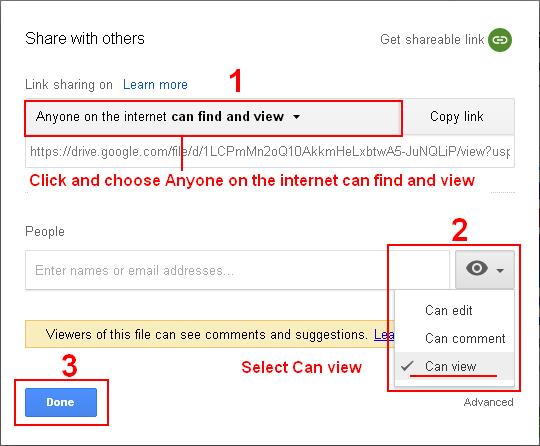
1. Go to https://drive.google.com and login with your google account. If you don't have create a new account. Now upload a PDF or DOC file. When the file upload completed Right click the file and click Share...


2. After sharing the file Right click the file and click Preview. 


3. Click the three dot to the right panel of your window and click Open in new window.

4. A new tab will open again click the three dot and click embed item


5. Copy and paste the html code to your blog post.

Hope you like it my post don't forget to share and subscribe!


Wednesday, November 29, 2017

How to copy someone's blogger themes or template in easy steps


You landed to a blog that is very attractive themes or template and you wanted to copy their themes and you as a blogger also wants to apply this theme to your blogspot but the BIG question is "Is it possible to copy someone's blogger template?" the answer is NO because if you notice the code in blogger under -Theme - Edit HTML the code is different when you view the page source code of a blogger.

Is there a code in View page source like the image above?


Note: You can still copy the template of a blogger if you luckily find the name of the template at its source.

Steps:

1. Go to a blogger page you want to copy or use their template.
2. Right click then choose View page source or Ctrl+U.
3. See screenshot


4. In the image you will notice the name of the template, designer, source of the template where to download. 
5. Now search the name of the template in internet or visit the site of the designer "http://www.bloggertheme9.com" and search the name of the template "Clean Shift Blogger Templates" and download it.
6. Login to your Blogger account go to Themes and click Backup / Restore and choose the template you downloaded while ago and upload.
7. Visit you blog and see the changes.

Hope you enjoy reading my blog please share!